How to check your Python environment for a malicious .pth file, and dodge the next poisoned release
SummaryToday's LiteLLM 1.107.0 stealer ran from a .pth file, which Python executes on every start, even when you only run pip. Here is a one-line check that starts no Python, a harmless demo we ran ourselves, and two install settings that would have kept that release off your machine.
· MODEL Editors · 4 min read
Some links may be affiliate links. Disclosure
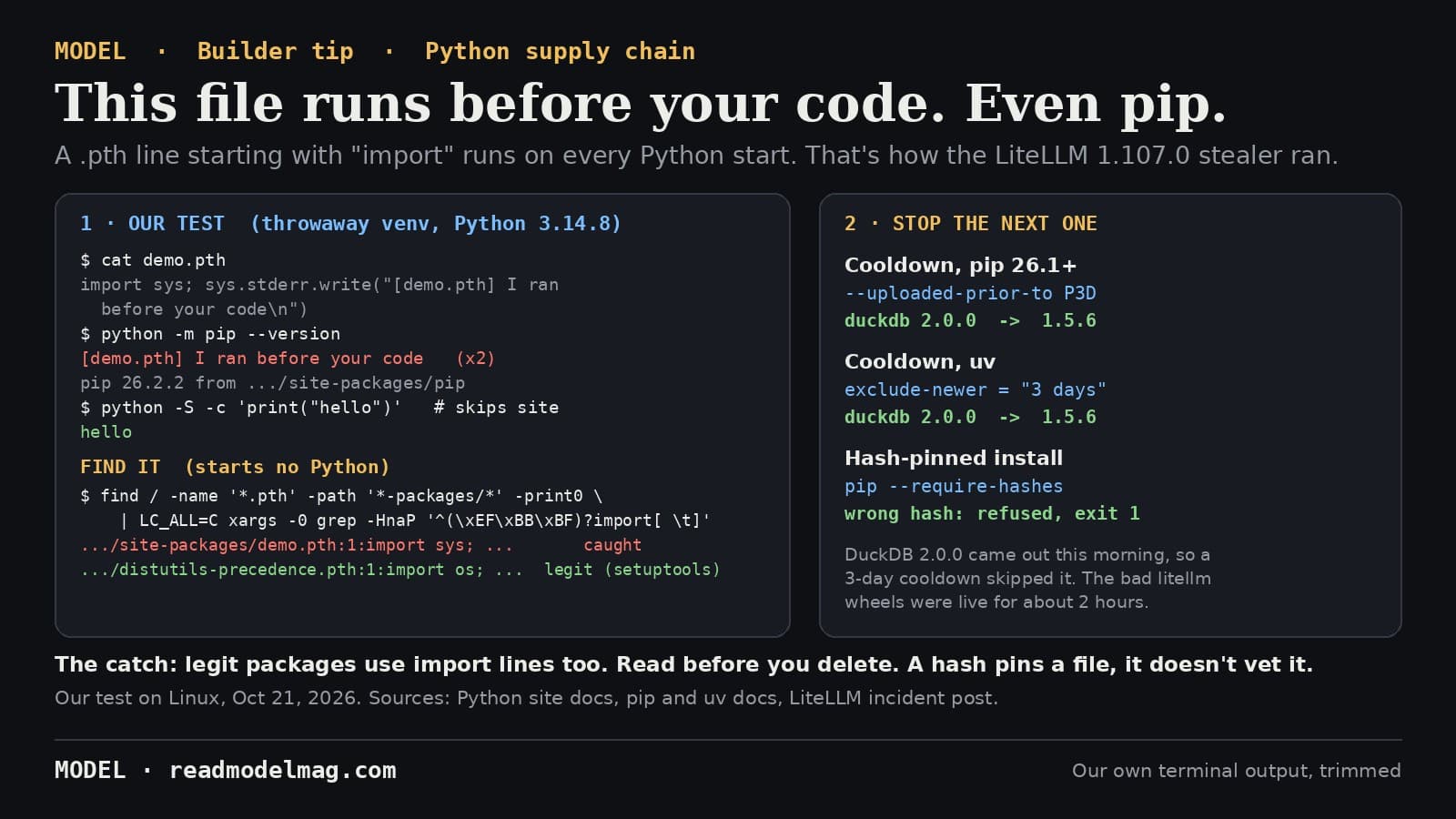
This morning's poisoned LiteLLM release (our story) didn't need you to import anything. Its cook.pth file ran on every Python start. LiteLLM's own incident post warns: "Don't start with pip install," because any Python start in an affected environment runs the payload again, pip included. So here is how to look for that kind of file without starting Python, and how to stop the next bad release before it lands.
Why a .pth file can run code. Python's site module reads every *.pth file in your site-packages folders at startup. Most lines just add a folder to the import path. But, in the words of the Python docs, "lines starting with import (followed by space or tab) are executed with exec()," and they always run at startup "regardless of whether a particular module is actually going to be used." After that, site also imports a sitecustomize module if one exists. The LiteLLM payload used both.
We checked it ourselves. In a throwaway virtual environment on Python 3.14.8 we added a one-line demo.pth that only prints a message: import sys; sys.stderr.write("[demo.pth] I ran before your code\n"). Then:
python -c 'print("hello")'printed our message before "hello".python -m pip --versionprinted it before pip's version line. Running pip runs the file.python -S(which turns off thesitemodule) printed only "hello".python -I(isolated mode) still ran it. Isolation doesn't skip.pthfiles.
In our venvs, on both Python 3.13.5 and 3.14.8, the line actually ran twice per start (same process). We didn't dig into why; once is enough.
The check (starts no Python). On Linux or macOS, this lists every .pth line Python would execute:
find / \( -path /proc -o -path /sys \) -prune -o -name '*.pth' -path '*-packages/*' -print0 2>/dev/null \
  | LC_ALL=C xargs -0 grep -HnaP '^(\xEF\xBB\xBF)?import[ \t]'
And this lists startup hook modules:
find / \( -path /proc -o -path /sys \) -prune -o \( -name sitecustomize.py -o -name usercustomize.py \) -path '*-packages/*' -print 2>/dev/null
On our machine, the first command took about 7 seconds over the whole filesystem and found exactly our two demo files. Point it at one project (find .venv ...) for a faster check. The pattern copies Python's own rule: the line has to start with import and a space or tab, and an optional byte-order mark is allowed. On macOS, use grep -E '^import[[:blank:]]' if your grep lacks -P.
Read before you delete. Legitimate packages use this too. In a second test venv, setuptools 84.2.1 installed distutils-precedence.pth, which starts with import os; var = 'SETUPTOOLS_USE_DISTUTILS'. Every hit needs a look. A file you can't trace to a package you meant to install, or a sitecustomize.py nobody on your team wrote, is the red flag. For today's incident specifically, LiteLLM says to look for litellm-1.107.0.dist-info, cook.pth and sitecustomize.py, and adds that not finding them "does not prove the environment is clean." If you find them, follow its cleanup steps, delete from the shell, and rotate credentials.
Stop the next one: add a cooldown. LiteLLM says the bad wheels were on PyPI for about two hours. Both major installers can ignore anything uploaded too recently:
- pip 26.1 and later:
pip install --uploaded-prior-to P3D ...(orPIP_UPLOADED_PRIOR_TO=P3D) only considers files uploaded at least three days ago. pip's docs note it only works on indexes that publish upload times. - uv:
exclude-newer = "3 days"inpyproject.toml([tool.uv]) oruv.toml. It also takes"1 week"or an ISO duration likeP7D, andexclude-newer-packagelets you exempt one package.
Our test: DuckDB 2.0.0 came out this morning. A plain pip install --dry-run duckdb picked 2.0.0. With --uploaded-prior-to P3D it picked 1.5.6. uv pip compile with --exclude-newer "3 days" did the same. The trade-off is real: a cooldown also delays urgent security fixes, so you'll need the per-package override sometimes.
And pin by hash. With pip install --require-hashes -r requirements.txt, every file must match a recorded SHA-256. We gave pip a wrong hash for duckdb 1.5.6. It refused with "THESE PACKAGES DO NOT MATCH THE HASHES" and exit code 1. uv pip compile --generate-hashes writes those hashes for you. The limit: a hash pins a file, it doesn't vet it. If you had re-locked onto 1.107.0 that morning, you would have pinned the malware. That's why the cooldown matters.
Our take
Run the find line on your laptop and your CI images today. It takes seconds and starts nothing. Then add a three-day cooldown and hash-pinned installs. None of this would have stopped LiteLLM's pipeline from being hijacked, but a three-day cooldown alone would have kept 1.107.0 off any machine installing from PyPI with it, since the release was pulled about two hours after upload. One more thing worth knowing: Python 3.15 deprecates import lines in .pth files, and the docs say they'll be silently ignored in 3.18 and 3.19. Until then, they run.
What we did and didn't do: we ran every command above on a Linux box on October 21, 2026, with harmless demo files only. We didn't download or run the malicious LiteLLM package. Windows paths and commands weren't tested. Facts come from the Python, pip and uv docs and LiteLLM's incident post (as last updated 20:30 UTC), all read today; the GitHub issue, JFrog and Wiz posts are further reading on the incident. Not sponsored; no affiliate links.
MODEL Editors
Sources
- site — Site-specific configuration hook (.pth files, .start files, sitecustomize)
Python documentation
- pip install (--uploaded-prior-to, --require-hashes)
pip documentation
- pip changelog (26.1: --uploaded-prior-to accepts a duration in days)
pip documentation
- uv settings reference (exclude-newer, exclude-newer-package)
uv documentation
- Contained: Oct 21, 2026 LiteLLM release v1.107.0 Compromised (last updated 20:30 UTC)
LiteLLM
- [SECURITY] litellm 1.107.0 compromised: cook.pth credential stealer + sitecustomize RCE loader (issue #47826)
GitHub
- LiteLLM Hijacked Again: Malicious 1.107.0 Wheels Steal Credentials and Load Remote Code
JFrog Security Research
- LiteLLM Compromised, Steals Credentials
Wiz
FREE · EVERY WEEK
The top AI tools this week, tested.
Every week MODEL's editors pick the AI tools worth your time, try them hands-on, and tell you what's good, what's not, and who it's for. Free, in your inbox.
Free. Unsubscribe anytime. Our picks are editorial and can't be bought.
The weekly three is editorial. A subscription does not buy a place in it.
Continue
Tools
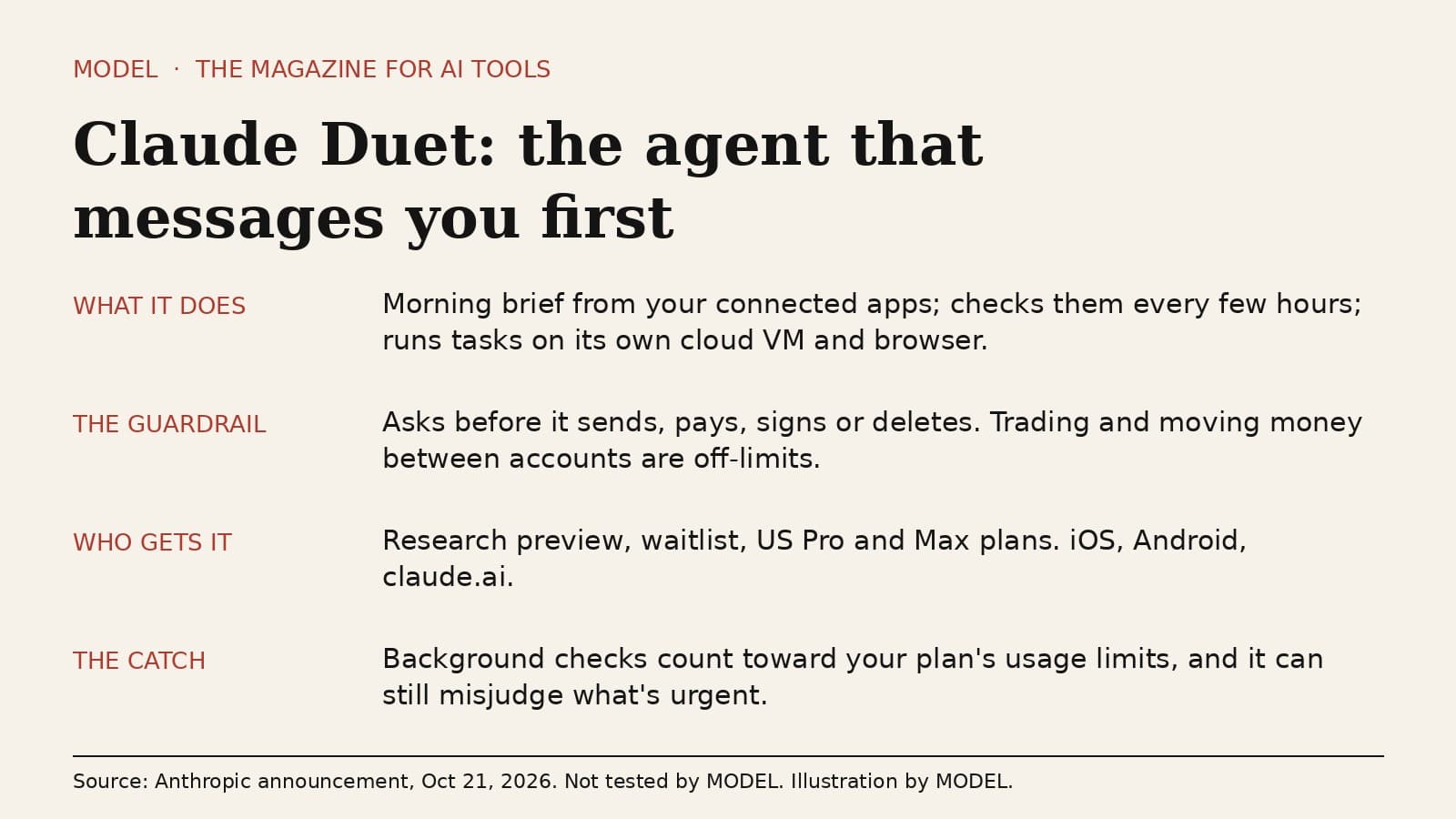
Claude Duet is an agent that messages you first. Watch the usage meter.
Anthropic opened a waitlist research preview of Claude Duet, a separate app where Claude sends a morning brief, checks your connected apps every few hours and runs tasks on its own cloud computer. It asks before it sends, pays, signs or deletes. The honest caveat: those background checks spend the same usage limits as the rest of your Claude plan.
· MODEL Editors
Hot take
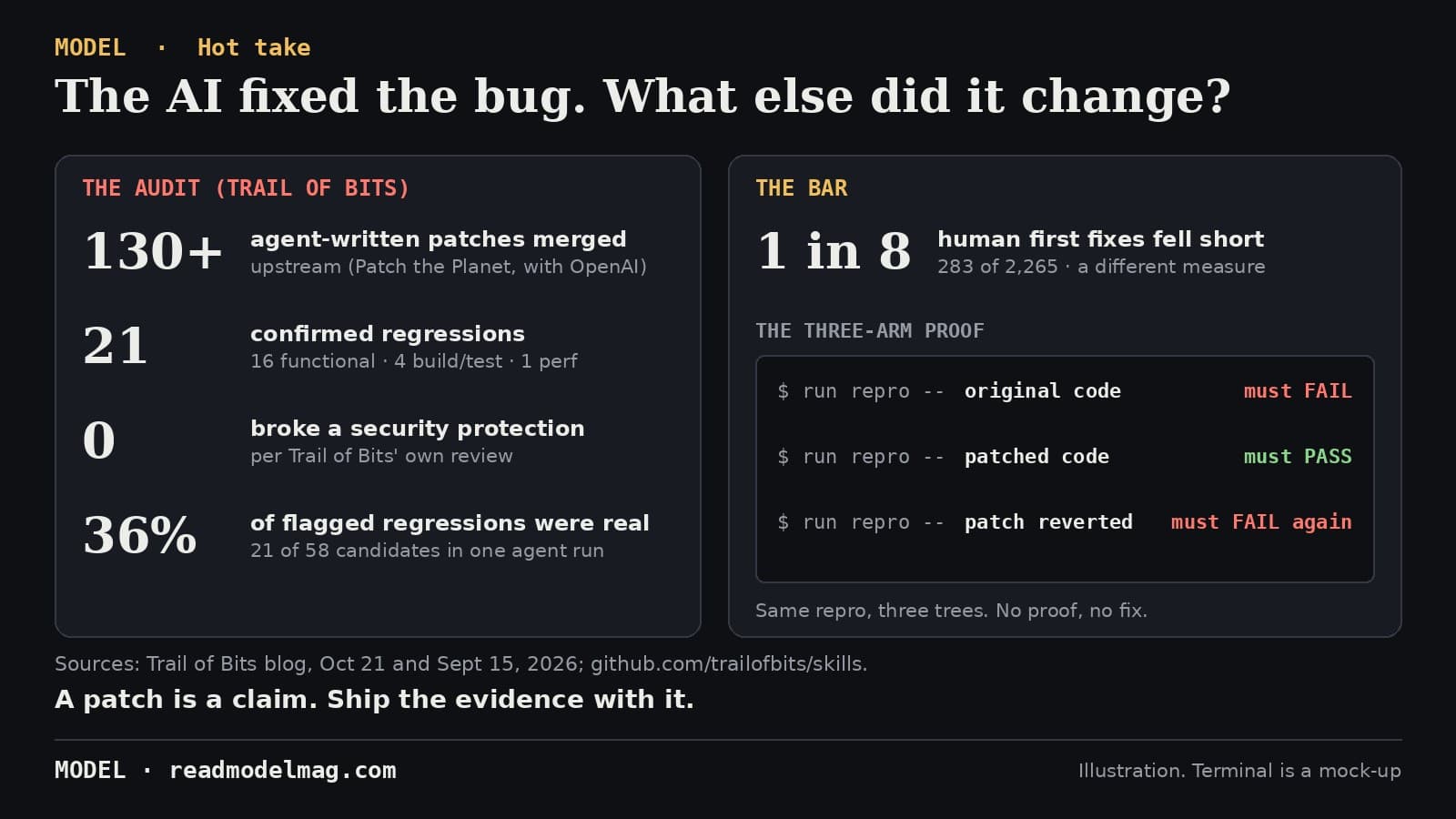
Your AI fixed the bug. Trail of Bits counted what else broke.
Trail of Bits reviewed every agent-written security patch its engineers got merged upstream: 21 confirmed regressions across more than 130 pull requests. None broke a security protection. The lesson isn't that agents can't patch. It's that a patch without proof is just a claim.
· MODEL Editors
The test
DuckDB 2.0, tested: faster, and built for your coding agent
DuckDB's biggest release ran our 8 test queries 1.7 times faster than 1.5.6 with the same answers. Its new agent mode gave an AI agent whole results in 30% fewer bytes. The catch: 1.x can't open its files, and dividing an integer by zero is now an error.
· MODEL Editors