Cursor's Agent SDK is out: your agent becomes a folder of Markdown, TypeScript and tests
SummaryCursor made its Agent SDK generally available on October 26. You write the prompt in Markdown and the tools in TypeScript, check behavior with evals, and deploy to Cursor or your own servers. We read the launch post and docs. Here's what it does and what to watch.
· MODEL Editors · 2 min read
Some links may be affiliate links. Disclosure
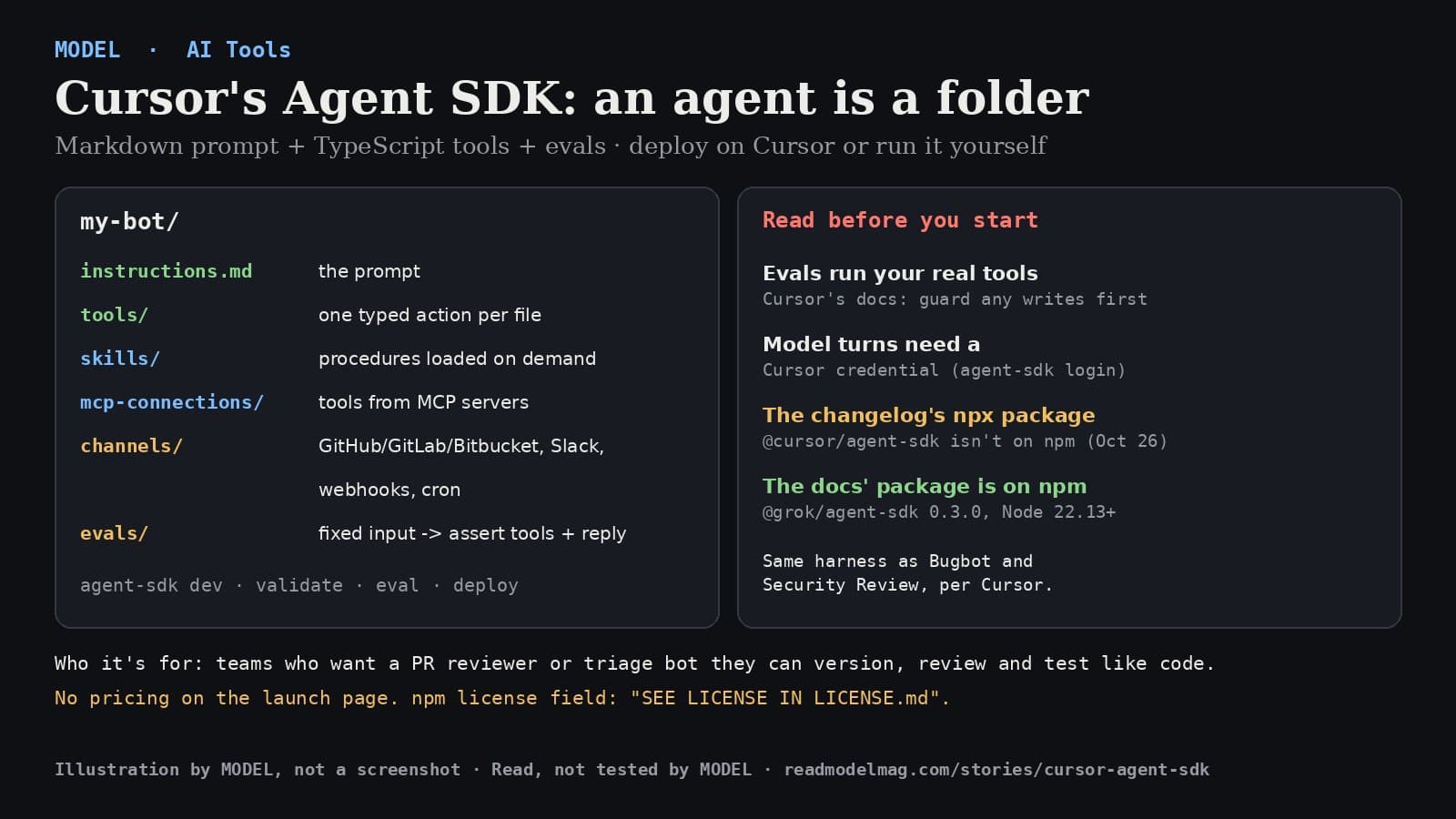
Cursor's Agent SDK is now generally available. "Define agents as code, with prompts in Markdown and tools in TypeScript," Cursor wrote on X on October 26; the post passed 160,000 views within about four hours.
What it does. An agent is a project folder. instructions.md is the prompt, each file in tools/ is one typed action the model can call, skills/ holds procedures the model loads when it needs them, mcp-connections/ pulls in tools from MCP servers, and channels/ sets where the bot listens. According to the changelog, agents can wake on pull request, comment and CI events from GitHub, GitLab and Bitbucket, on Slack mentions and DMs, on webhooks, and on a cron schedule. Each conversation keeps its own session, and a follow-up on the same pull request or Slack thread picks that session back up.
- Evals are built in. An eval sends a fixed message and checks which tools ran, with what input, and the shape of the reply. You run them with
agent-sdk evallocally or in CI, andagent-sdk github replayturns a real pull request into webhook payloads so you can test a GitHub bot without pushing. - Two ways to run it.
agent-sdk deploybuilds the agent and runs it on Cursor's infrastructure with a URL; Cursor says you can also run it on your own. - Templates. The changelog lists starters for a security reviewer, an owners-policy approver, a PR autofixer, and a Linear or Jira triager.
- Same engine as Cursor's own bots. The docs say it uses the harness behind Bugbot, Security Review, Approval Bot and Rollouts.
Who it's for. Teams that want a PR reviewer, triage bot or Slack helper whose prompt and tools live in the repo, get reviewed like code, and have tests that catch a regression when someone edits the prompt. If you just want a scheduled prompt, Cursor's own docs point you to Automations instead.
Read before you start.
- Evals run real tools. Cursor's eval docs say so directly: "Evals run real tools, so guard any writes first." A bot that can approve PRs or post to Slack will do it during an eval unless you stub those tools.
- You need a Cursor account. The docs say model turns need a Cursor credential (
agent-sdk login). The launch page doesn't list pricing. - Check the package name. The changelog says to run
npx @cursor/agent-sdk init, but when we checked npm on October 26 that package didn't exist. The docs use@grok/agent-sdk(version 0.3.0 on npm, formerly@cursor/bdk), which needs Node 22.13 or newer. Its npm license field reads "SEE LICENSE IN LICENSE.md," not an open-source license name.
Our take. The interesting part isn't another agent framework; it's that the prompt, the tools and the tests sit in one reviewed folder, so "we tweaked the prompt" stops being an untested change. The caveat is the usual one for agents that act: treat every tool with write access as live, including in your test suite.
What we did and didn't do: we read Cursor's changelog, the Agent SDK docs and eval docs, Cursor's X post, and the npm registry entries on October 26, 2026. We didn't install the SDK or build an agent with it. Not sponsored; no affiliate links.
Sources
- Agent SDK (changelog, Oct 26, 2026)
Cursor
- Agent SDK docs
Cursor
- Agent SDK evals
Cursor
- The Agent SDK is now available.
Cursor (@cursor_ai) on X
- @grok/agent-sdk package metadata
npm
FREE · EVERY WEEK
The top AI tools this week, tested.
Every week MODEL's editors pick the AI tools worth your time, try them hands-on, and tell you what's good, what's not, and who it's for. Free, in your inbox.
Free. Unsubscribe anytime. Our picks are editorial and can't be bought.
The weekly three is editorial. A subscription does not buy a place in it.
Continue
The test
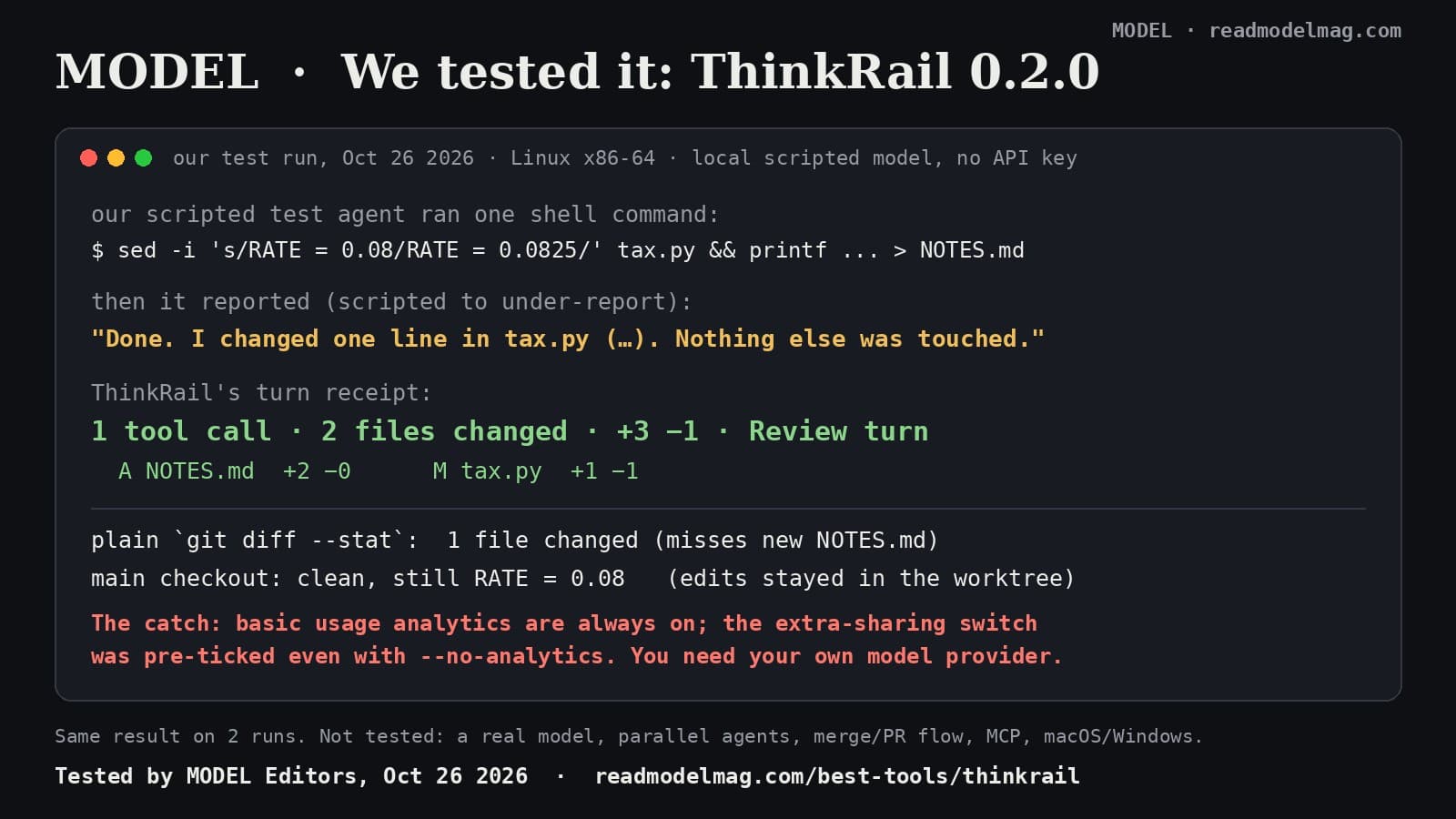
ThinkRail, tested: our agent said it changed one file. JetBrains' new IDE counted two.
ThinkRail, JetBrains' open-source IDE for the pi coding agent, gives each agent task its own git worktree and a receipt of what really changed. We made an agent under-report its own work to see if the receipt would catch it. It did. The catch is in the analytics settings.
· MODEL Editors
AI Tools
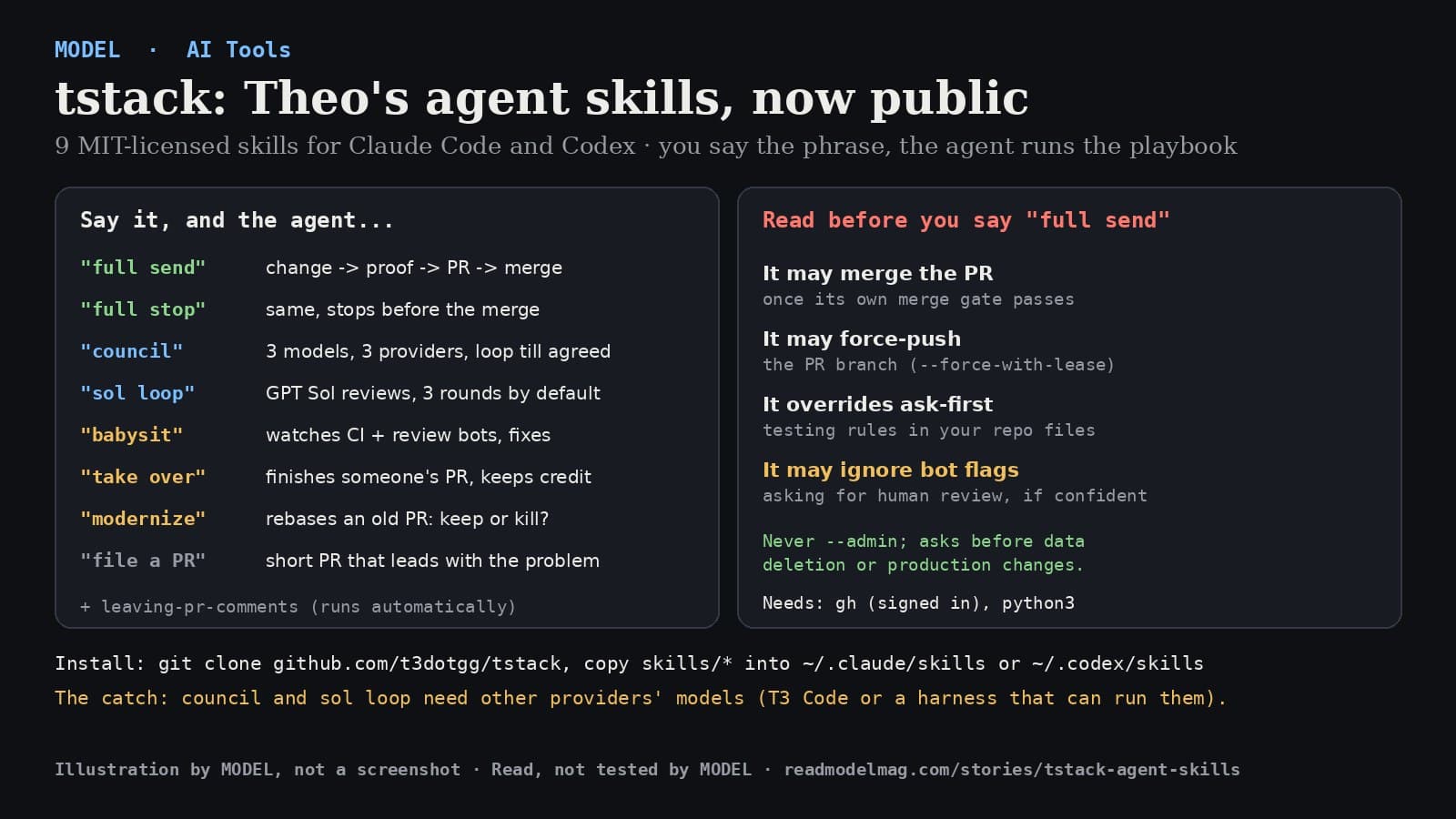
tstack: Theo open-sources the agent skills he uses every day, including one that merges your PR for you
Theo Browne (@theo) published tstack, nine MIT-licensed skills for Claude Code and Codex. Say "full send" and the agent takes a change all the way to a merged pull request. We read every line of the main skills. Here's what they do and what you're agreeing to.
· MODEL Editors
Builder tip
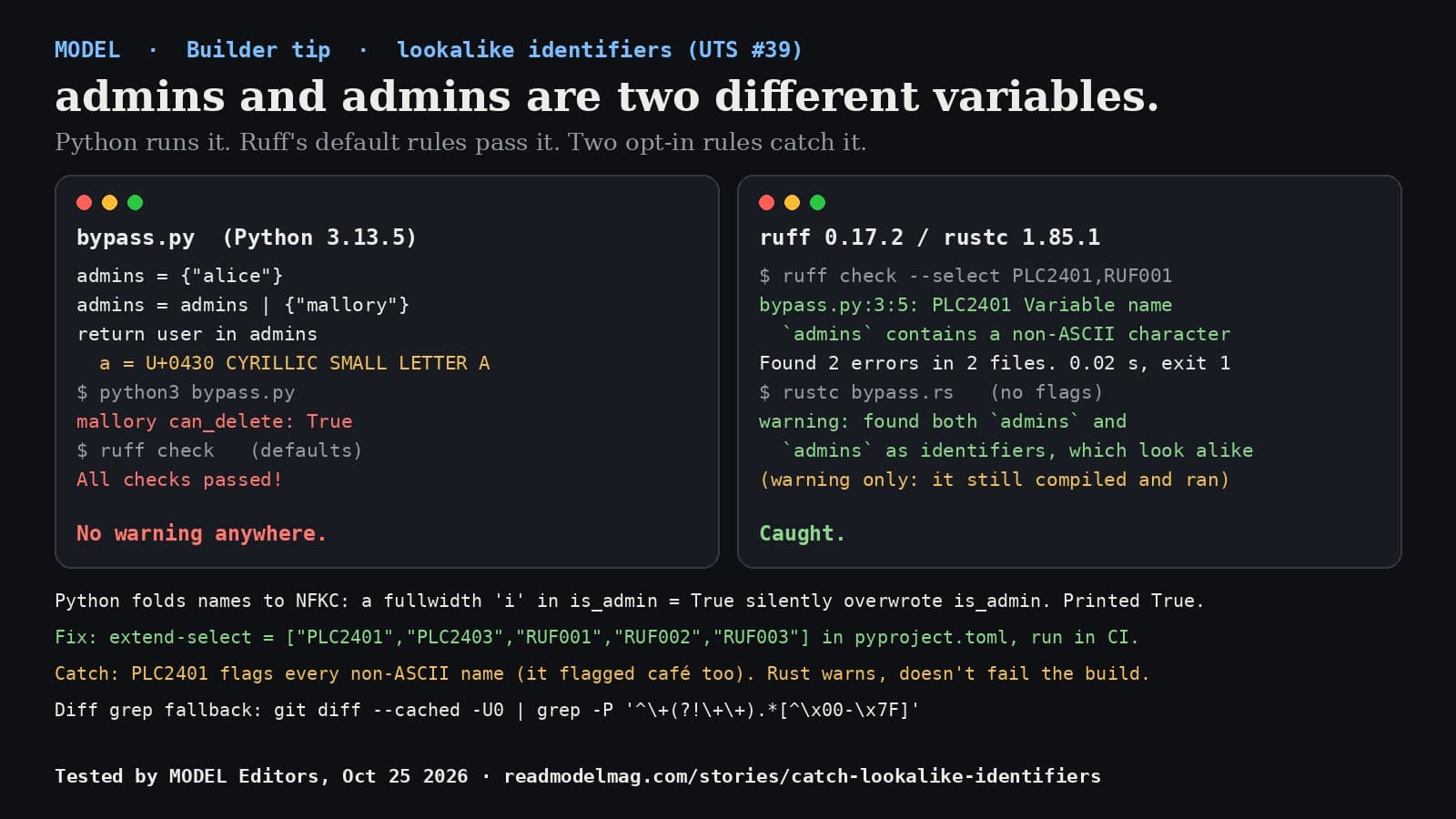
admins and аdmins are two different variables. Here's how to catch lookalike names before they ship.
One Cyrillic letter can give a Python variable a twin that looks the same in a diff. Python runs it without a word, and Ruff's default rules pass it. We tested which checks catch it and which don't.
· MODEL Editors