OpenAI's prompt cache now lasts 12 hours. Here's how to actually get the hits.
SummaryOpenAI's API can now keep a cached prompt for 12 hours instead of 30 minutes. It costs more to write and the same to read, and it only pays off if your request is laid out so the cache can match. Here is the layout, the math and the gotcha that quietly turns caching off.
· MODEL Editors · 4 min read
Some links may be affiliate links. Disclosure
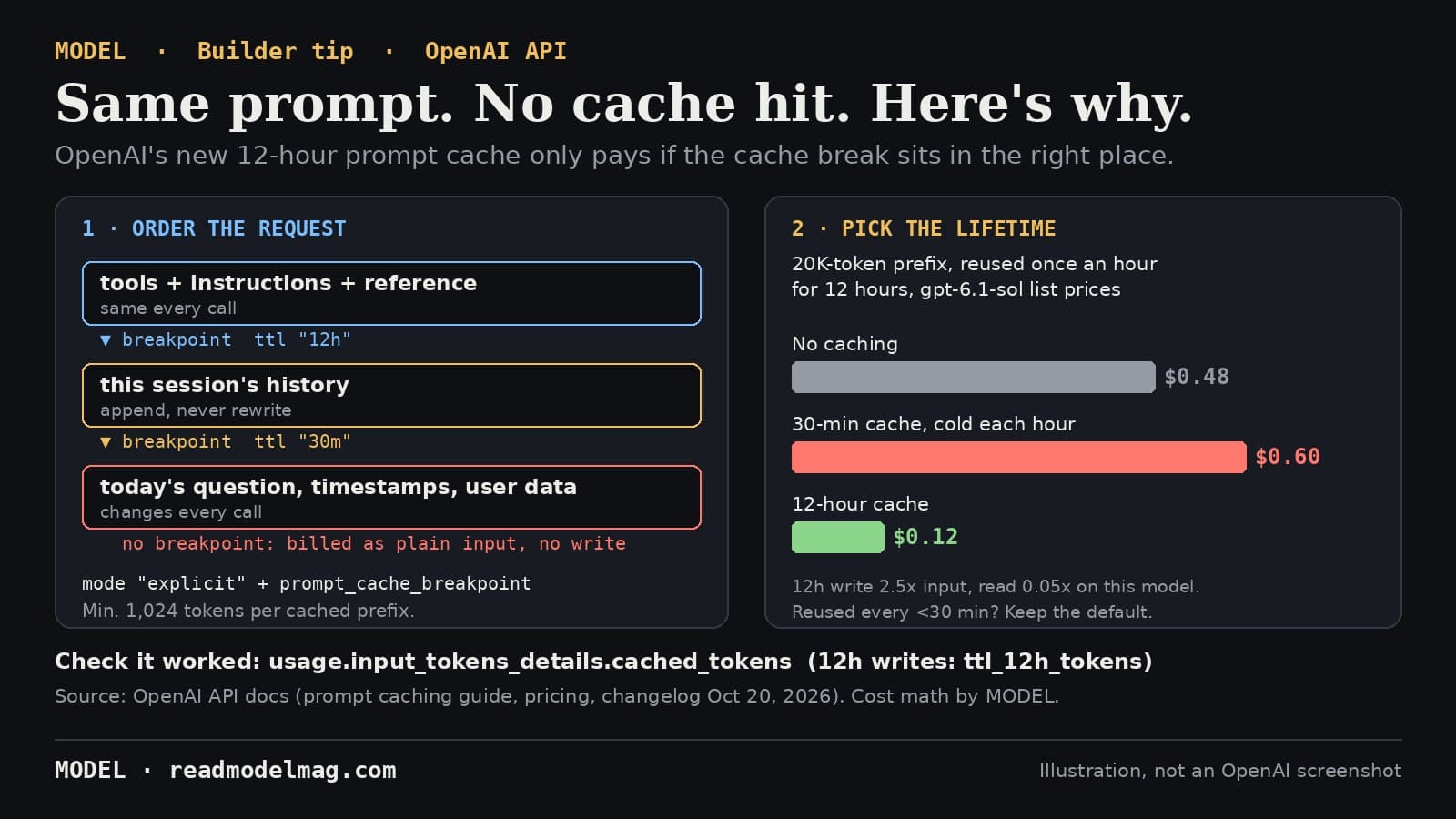
OpenAI announced on October 20 that you can now keep a cached prompt for 12 hours in its API, up from a default of 30 minutes. The pitch, from its developer account: agents that reuse the same instructions, tools and context all day can pay the lower cached-input rate "even when requests are hours apart."
That part is real. But a longer cache does nothing if your requests never match it, and OpenAI's own guide lists several quiet ways to miss. Here is what the docs say, in plain terms.
What changed. On GPT-5.6 and later models, in the Responses API, you set prompt_cache_options.ttl to "30m" (the default) or "12h". Writing a prompt into the cache costs 1.25 times the normal input price for 30 minutes, or 2.5 times for 12 hours. Reading it back costs 0.1 times the input price on most of these models, and 0.05 times on GPT-6.1 Sol, whichever lifetime you picked. On GPT-6.1 Sol that works out to $2.00 per million input tokens, $0.10 to read from the cache, $2.50 to write for 30 minutes and $5.00 to write for 12 hours, for prompts up to 272K tokens. The 12-hour option is Responses API only. Older models keep their own prompt_cache_retention setting, which this does not change.
Rule 1: stable first, changing last. The cache only matches from the very first token. Anything that changes between calls, like a timestamp, a user's name or today's question, has to sit after everything that stays the same. Put tool definitions, instructions and reference material at the top, and append new turns instead of rewriting old ones. OpenAI's guide also lists settings that break the match when they change: the model, the tool list (names, descriptions, schemas or order), the structured-output schema, reasoning.effort, text.verbosity, and compaction. To switch tools off for one call, it suggests tool_choice: "none" or allowed_tools rather than deleting tools from the list.
Rule 2: put a breakpoint where the stable part ends. This is the gotcha. On GPT-5.6 and later, the default "implicit" mode saves the cache at the end of the latest message. So if your request is a fixed developer message plus a different user message each time, the saved prefix includes that user message, and the next call, with a new user message, doesn't match it. OpenAI's fix: set prompt_cache_options.mode to "explicit" and add prompt_cache_breakpoint: { "mode": "explicit" } to the last block of stable content. Content after the last breakpoint is billed as ordinary input, with no cache-write charge. You can mix lifetimes in one request: a "12h" breakpoint after the shared instructions and a "30m" one after the session's history. Each request can make up to four cache writes.
Rule 3: clear the minimum. A cached prefix must be at least 1,024 visible tokens on GPT-5.6 and later. A short system prompt simply won't cache.
When 12 hours is worth it. A cache read refreshes a 30-minute entry, so if the same prefix is reused at least every half hour, the default is cheaper. The 12-hour option pays when the gaps are long. Our math, at GPT-6.1 Sol list prices, for a 20,000-token prefix used once an hour for 12 hours, assuming each 30-minute entry has gone cold by the next call:
- No caching: 12 × 20,000 tokens at $2.00 per million = $0.48
- 30-minute cache, a fresh write every hour: 12 writes at $2.50 per million = $0.60, more than not caching at all
- 12-hour cache: one write at $5.00 per million plus 11 reads at $0.10 per million = about $0.12
By the same arithmetic, 12 hours comes out ahead once the prefix would otherwise be rewritten three or more times in the day. One caution from the docs: OpenAI may keep entries longer than the minimum, but the minimum lifetime is what guarantees read pricing, and even then a hit is not guaranteed, because caches live on individual machines and traffic above about 15 requests a minute can be routed elsewhere.
Rule 4: check it worked. Every response reports usage.input_tokens_details.cached_tokens (tokens billed as cache reads) and cache_write_tokens, split into ttl_30m_tokens and ttl_12h_tokens. Divide cached tokens by total input tokens to get your hit rate. If it's near zero, look for something changing near the top of the prompt. Two more facts from the guide: cached tokens still count toward your tokens-per-minute rate limit, and you can't clear the cache by hand.
Who it's for: anyone running an agent or app that sends the same long instructions, tools or documents many times a day, especially with gaps longer than half an hour.
Our verdict: worth ten minutes. Move the changing parts to the end, add one explicit breakpoint, check cached_tokens, and only then decide whether 12 hours beats the default for your traffic.
MODEL has not tested 12-hour caching hands-on. Everything above comes from OpenAI's prompt caching guide, pricing page and changelog, and its developer account's announcement, all read on October 20, 2026. The cost example is our own arithmetic from OpenAI's list prices. This is not sponsored and has no affiliate links.
Sources
- Prompt caching guide (cache lifetime, breakpoints, gotchas, usage fields)
OpenAI API docs
- API changelog, Oct 20, 2026: 12-hour prompt caching
OpenAI API docs
- API pricing (cached input, 30m write and 12h write rates)
OpenAI API docs
- Announcement post (Oct 20, 2026)
OpenAI Developers on X
FREE · EVERY WEEK
The top AI tools this week, tested.
Every week MODEL's editors pick the AI tools worth your time, try them hands-on, and tell you what's good, what's not, and who it's for. Free, in your inbox.
Free. Unsubscribe anytime. Our picks are editorial and can't be bought.
The weekly three is editorial. A subscription does not buy a place in it.
Continue
Hot take
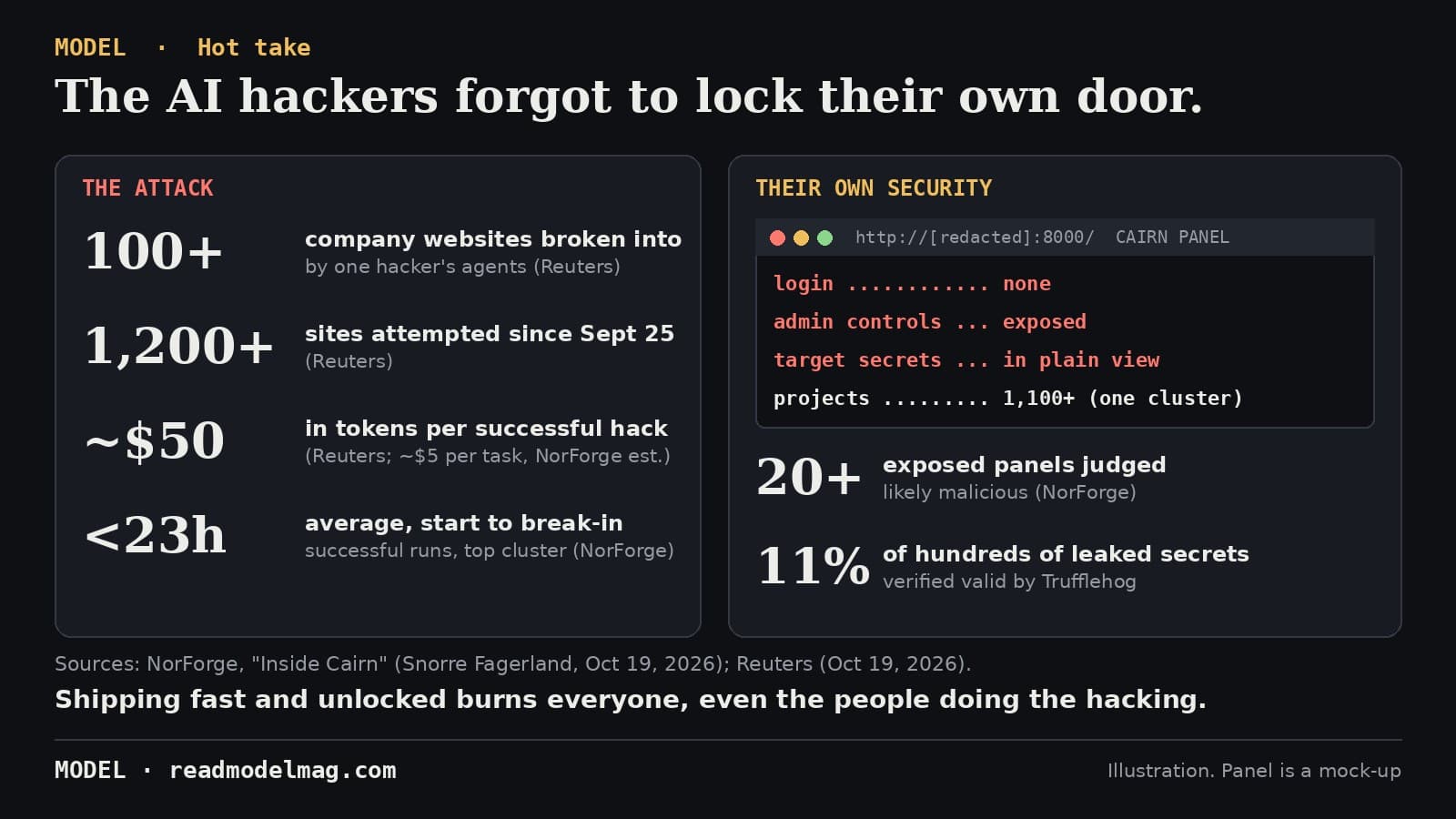
The AI hackers forgot to lock their own door
NorForge watched criminals point AI agents at more than a thousand online shops, because the attackers left their own control panels open on the web. Reuters says one hacker's agents got into more than 100 companies. The sloppiest code in this story belongs to everyone involved.
· MODEL Editors

The test
tsrs: TypeScript in Rust, timed
The new Rust port of the TypeScript compiler checked Playwright's 1,511 files 6.4 times faster than TypeScript 7.0.2 on our box, with two-thirds less memory and the same errors, word for word. The catch: it follows TypeScript 7.1, not the 7.0 you have.
· MODEL Editors
Tools
Vercel's durable-harness lets Claude Code, Codex, OpenCode and Pi survive a crash mid-task
A new open-source package from Vercel writes every model call and tool call an agent makes to a durable log, so a turn that loses its server picks up where it stopped instead of starting over. The honest caveat: it is a 0.0.1 beta, and Vercel calls its Claude Code and Codex support experimental.
· MODEL Editors