Serving an open model with vLLM? Your tool schemas aren't enforced by default. One flag fixes that
SummaryUbicloud's write-up on fixing tool-call accuracy in vLLM hit the Hacker News front page today. We tested vLLM 0.32.0's own grammar code on a CPU box: with default settings, nothing stops a Kimi K2 tool call with the wrong key, a bad enum or a missing field. Here's the flag, the per-request switch, and what each one blocks.
· MODEL Editors · 4 min read
Some links may be affiliate links. Disclosure
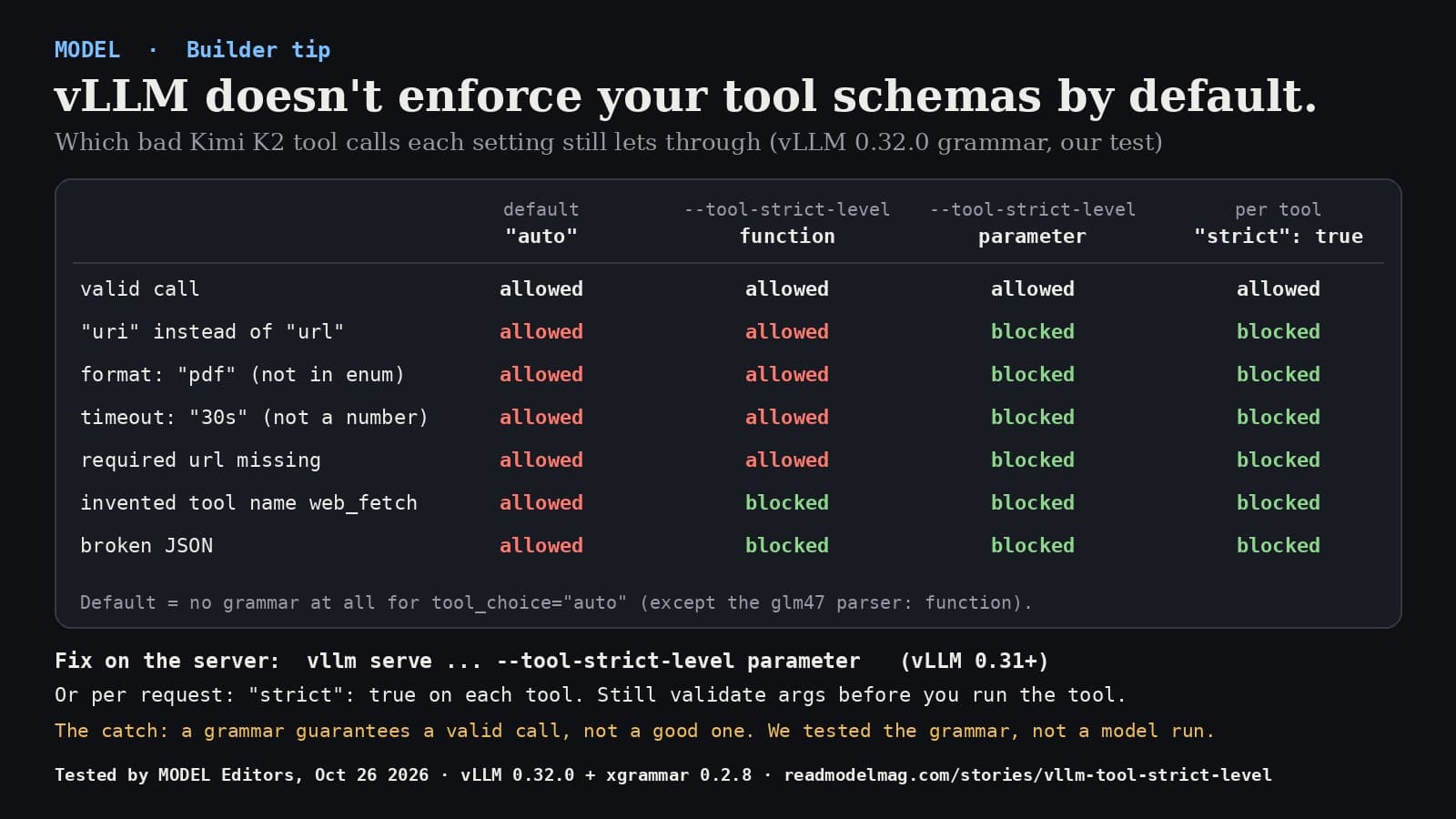
When an agent framework talks to a model you serve with vLLM, it sends a list of tools, each with a JSON schema for its arguments. It's easy to assume the server makes the model stick to that schema. With vLLM's default settings and tool_choice: "auto", which is what most agent frameworks send, it doesn't. The model writes the tool call freely, and whatever comes out goes back to your agent.
That's the subject of a post by Ubicloud (opens in a new tab) (dated October 20) that reached the Hacker News front page today. Ubicloud says that when it served Kimi K2.6 on vLLM 0.28, only 92% of tool calls matched the expected schema on Moonshot AI's K2VV ToolCall benchmark. After it turned on constrained decoding, it measured 100%. Those are Ubicloud's numbers; we didn't rerun the benchmark.
The switch. vLLM 0.31.0 (released October 4 Pacific time) added a server option, --tool-strict-level. In the words of vLLM's docs, "Most OpenAI-compatible clients and agent frameworks never set strict on their tools, so with tool_choice="auto" the model generates tool calls without any grammar and malformed markup can leak into the response." The option has three values:
auto(the default): follow the request. Fortool_choice: "auto", a grammar only kicks in when at least one tool sets"strict": true.function: always constrain the tool-call wrapper and the function name, but leave the arguments free.parameter: also enforce every tool's argument schema, as if every tool had"strict": true.
There's a client-side route too: set "strict": true on each tool in your request. A tool without it keeps free-form arguments, even if another tool in the same request is strict.
We tested it. We have no GPU on our test box, so we didn't run a model. Instead we installed vLLM 0.32.0 (the current release) and xgrammar 0.2.8, the library vLLM uses to build these grammars, on a CPU-only Linux machine. We called vLLM's own get_model_structural_tag function the way its Kimi K2 tool parser does, using a webfetch tool shaped like the one in Ubicloud's post (a required url, a format limited to text, markdown or html, and a numeric timeout). Then we asked xgrammar whether each of seven possible model outputs fits the grammar vLLM would apply. Results:
- Default (
auto), nostricton the tool: vLLM builds no grammar at all. All seven outputs, including broken JSON, are possible. --tool-strict-level function: an invented tool name (web_fetch) and broken JSON were blocked. A wrong key (uri),format: "pdf",timeout: "30s"and a missingurlwere all still allowed.--tool-strict-level parameter: all six bad outputs were blocked; the valid call was allowed. An extra key next to a validurlwas blocked too.- Default level, but
"strict": trueon the tool: same asparameter. All six blocked.
One more result surprised us: with tool_choice: "required" and the default level, vLLM did build a grammar for the call, but the argument part of it was true, meaning any JSON at all. In this Kimi K2 setup, forcing a tool call didn't enforce its arguments. (vLLM's docs say parsers that use a different, schema-derived grammar do enforce them for required calls.)
Turn it on. If you run the server:
vllm serve <model> --tool-call-parser kimi_k2 --enable-auto-tool-choice --tool-strict-level parameter
If you only control the client, add "strict": true to each function in tools. vLLM's docs suggest writing those schemas in OpenAI's strict style: additionalProperties: false, every field listed as required, and optional fields allowed to be null. Two exceptions from the docs: the glm47 parser already defaults to function, and setting the environment variable VLLM_ENFORCE_STRICT_TOOL_CALLING=false turns all of this off, whatever the flag says.
And check on your side anyway. Before your agent runs a tool, validate the arguments against the same schema. In our test, Python's jsonschema 4.26.0 rejected the uri, pdf and "30s" arguments with clear messages (for example, "'pdf' is not one of ['text', 'markdown', 'html']"). That works with any provider. One limit we found: our test schema didn't set additionalProperties: false, so jsonschema let an extra key through. Set it.
The catch. vLLM's docs put it plainly: with constrained decoding, "You are guaranteed a validly-parsable function call - not a high-quality one." A grammar can't stop the model from fetching the wrong URL. Ubicloud also explains why vLLM doesn't turn this on by default: it says users of gpt-oss-20b, Qwen 3.6 and GLM 5.1 reported problems when the feature was on by default, because forcing tokens can push some models off course. So turn it on, then rerun your own agent evals before and after.
Our take
If you serve Kimi, DeepSeek or another open model to coding agents through vLLM 0.31 or later, set --tool-strict-level parameter and rerun your evals. If you only write the client, mark your tools "strict": true and validate arguments before you execute them. It's a one-line change, and the default setting has no protection against malformed calls.
What we did and didn't do: we ran vLLM 0.32.0's grammar-building code and xgrammar's matcher on October 26, 2026, on a Linux box with no GPU. We didn't run a model, a vLLM server or the K2VV benchmark, so we can't tell you how often any model produces these bad calls, or what the setting does to speed or answer quality. We only tested the Kimi K2 format. The 92% and 100% figures are Ubicloud's. Facts come from vLLM's docs, release notes and source code, and Ubicloud's post, all read today. Not sponsored; no affiliate links.
MODEL Editors
Sources
- Tool Calling (Strict Mode, Server-Side Strictness Floor)
vLLM documentation
- vLLM v0.31.0 release notes (new option: --tool-strict-level, #56268)
GitHub
- [Frontend] Add --tool-strict-level for server-side control for structural tag activation (PR #56268)
GitHub
- Fixing Tool-Call Accuracy in vLLM
Ubicloud
- Hacker News discussion (item 50242870)
Hacker News
FREE · EVERY WEEK
The top AI tools this week, tested.
Every week MODEL's editors pick the AI tools worth your time, try them hands-on, and tell you what's good, what's not, and who it's for. Free, in your inbox.
Free. Unsubscribe anytime. Our picks are editorial and can't be bought.
The weekly three is editorial. A subscription does not buy a place in it.
Continue
AI Tools
Cursor's Agent SDK is out: your agent becomes a folder of Markdown, TypeScript and tests
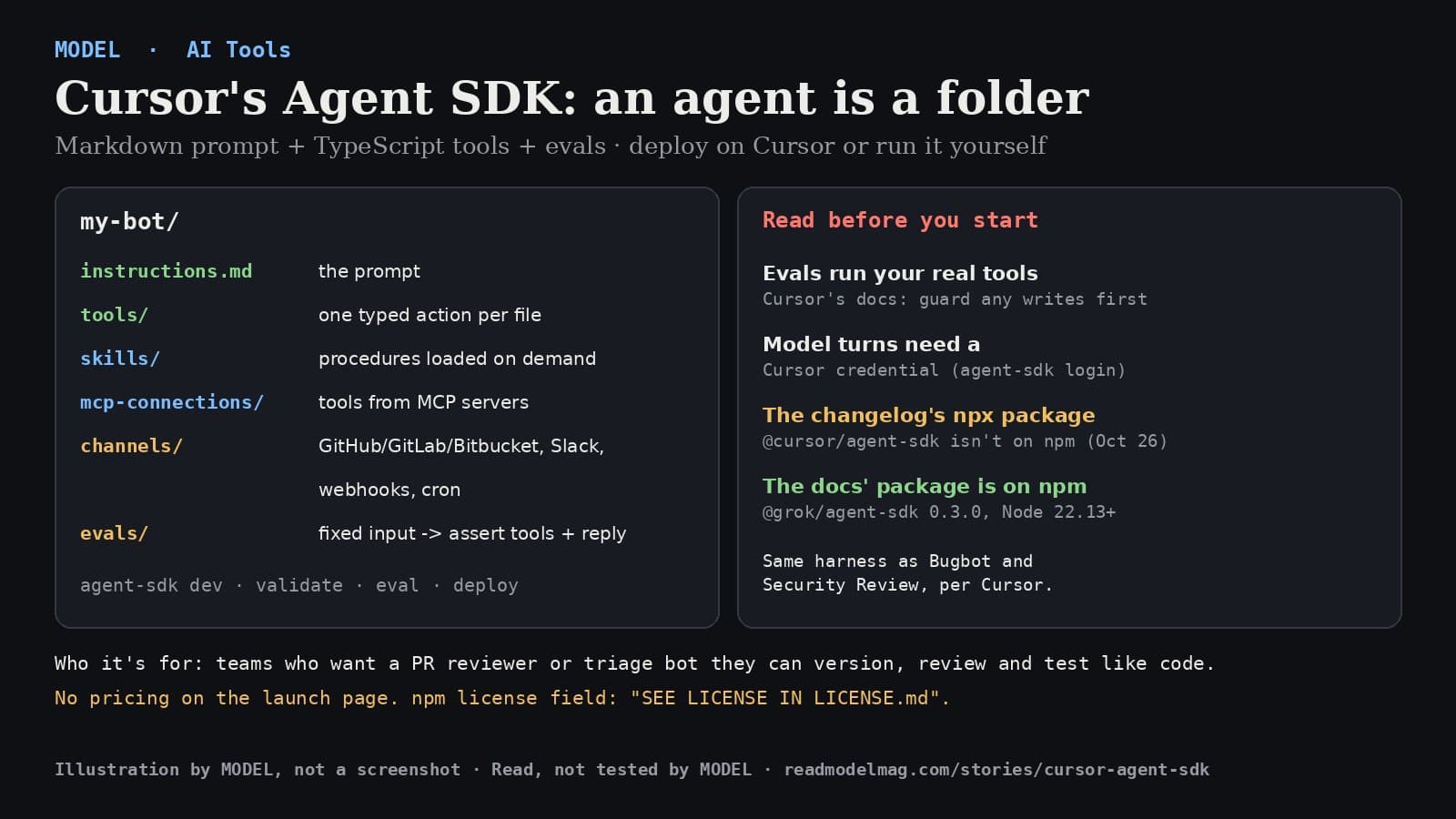
Cursor made its Agent SDK generally available on October 26. You write the prompt in Markdown and the tools in TypeScript, check behavior with evals, and deploy to Cursor or your own servers. We read the launch post and docs. Here's what it does and what to watch.
· MODEL Editors
The test
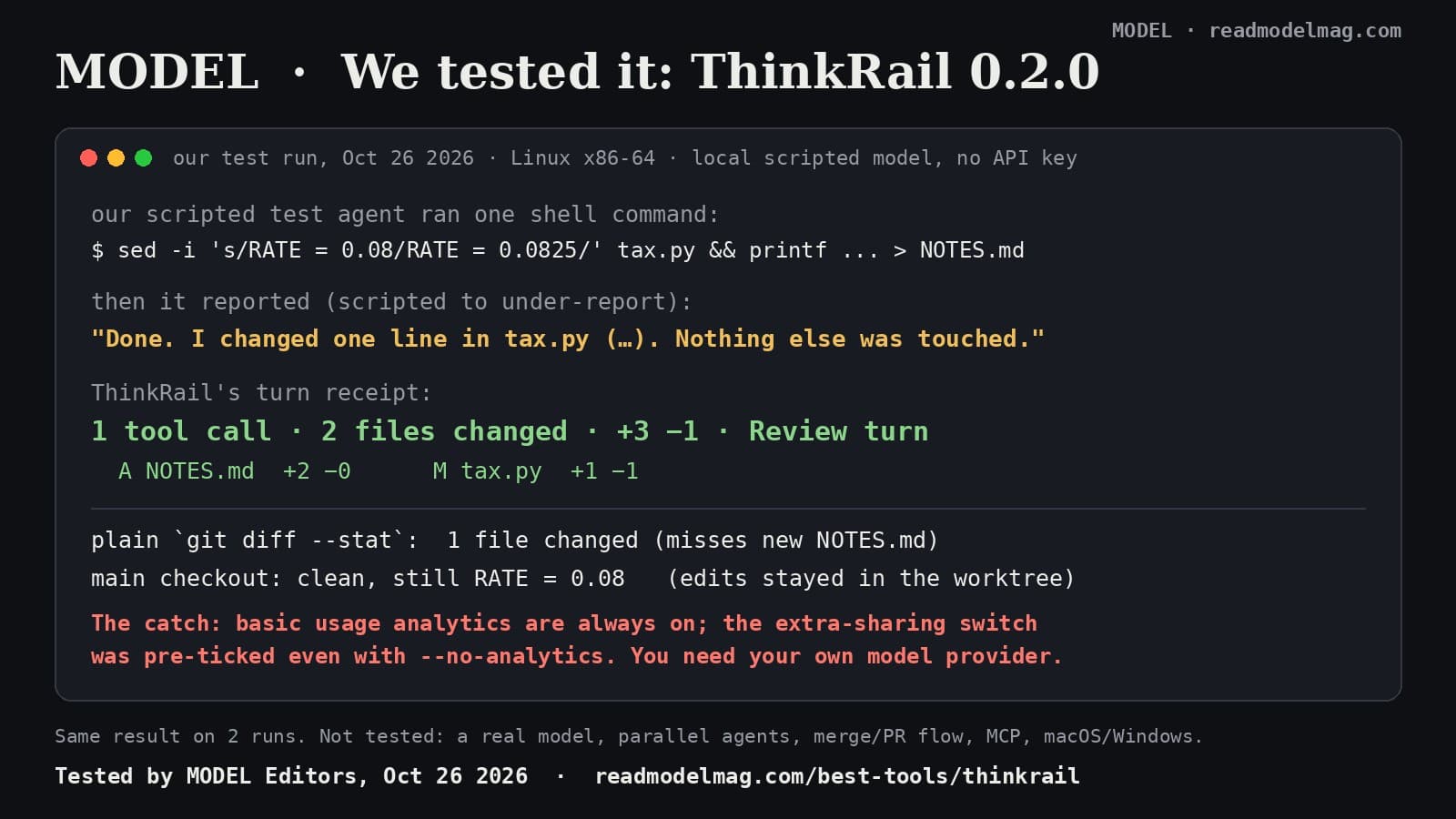
ThinkRail, tested: our agent said it changed one file. JetBrains' new IDE counted two.
ThinkRail, JetBrains' open-source IDE for the pi coding agent, gives each agent task its own git worktree and a receipt of what really changed. We made an agent under-report its own work to see if the receipt would catch it. It did. The catch is in the analytics settings.
· MODEL Editors
AI Tools
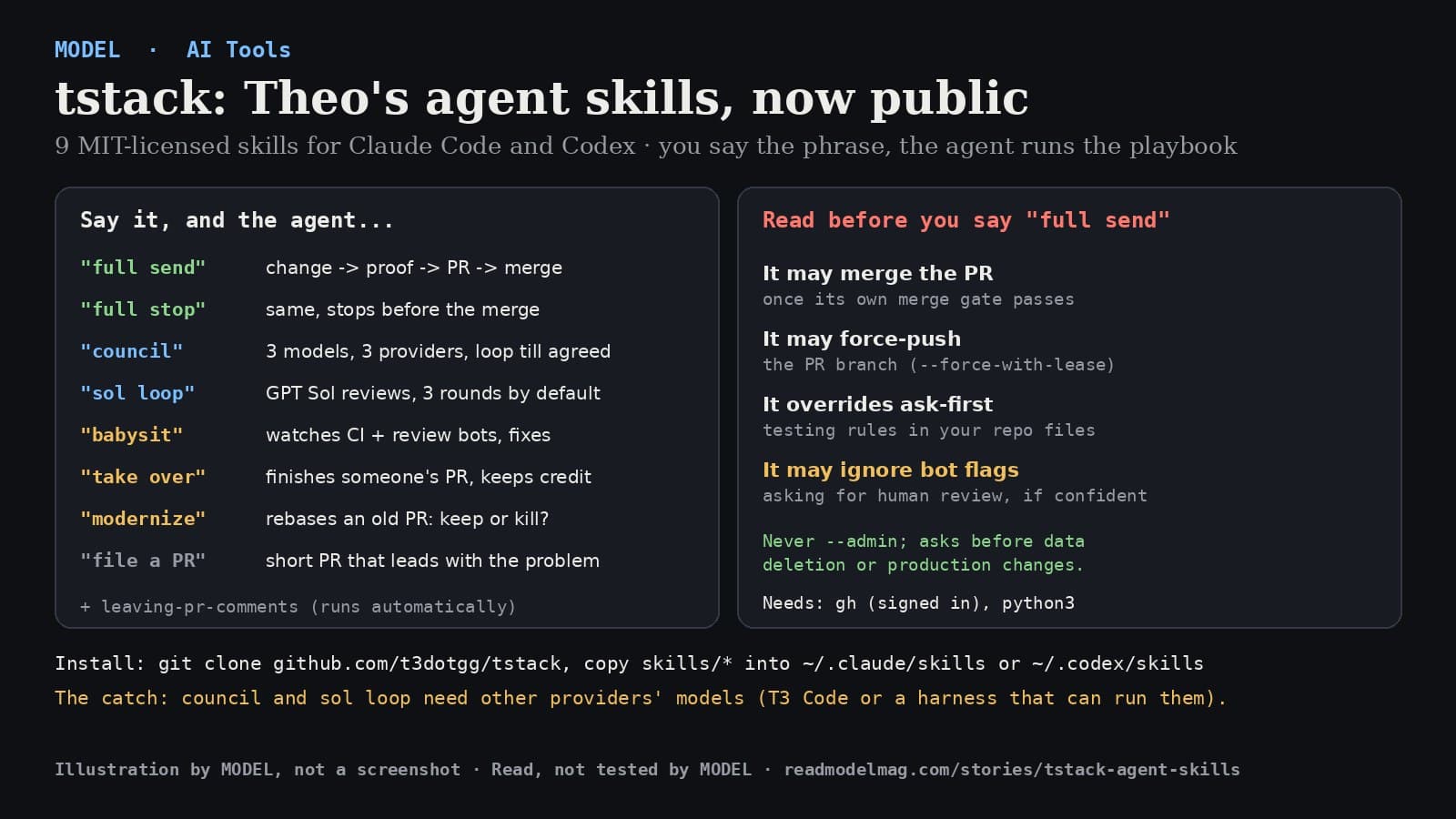
tstack: Theo open-sources the agent skills he uses every day, including one that merges your PR for you
Theo Browne (@theo) published tstack, nine MIT-licensed skills for Claude Code and Codex. Say "full send" and the agent takes a change all the way to a merged pull request. We read every line of the main skills. Here's what they do and what you're agreeing to.
· MODEL Editors