graphify, tested: it found every caller, once we gave it the tsconfig
SummaryThe open-source tool that turns a codebase into a graph your coding agent can query shipped version 0.9.94 this morning. On our own Next.js site it mapped 75 files in half a second with no AI model and no key, and found every file that calls a function. Without our tsconfig.json it found none, and said so as if that were the answer.
· MODEL Editors · 3 min read
Some links may be affiliate links. Disclosure
graphify turns a folder of code (and, with an AI model, docs, PDFs and images) into a knowledge graph: functions, classes and files as nodes, calls and imports as edges. Your coding agent then asks the graph "who calls this?" instead of grepping and reading whole files. It installs as a /graphify skill for Claude Code, Cursor, Codex, Gemini CLI and others, and also runs as a plain command-line tool. It's open source under Apache-2.0 from Graphify Labs, with more than 132,000 GitHub stars, and it was on GitHub's daily trending list this morning.
Version 0.9.94 came out today at 9:19 a.m. Pacific. The release notes list 19 community pull requests, including a security pass on URL fetching (it now rejects URLs with no hostname, a bad port or a user:pass@ login, on every redirect) and fixes to how JavaScript, TypeScript and SQL code gets linked up.
The test. We installed graphifyy 0.9.94 from PyPI (the package name has a double y for now; the command is graphify) into a fresh Python 3.13 environment on an 8-core Linux box. We pointed it at a copy of this website's own code: 75 TypeScript files, about 4,800 lines. We used only the code path, graphify update, which parses files locally and calls no AI model, so no account and no API key. We didn't run graphify install, which writes skill files into your agents' config folders. Then we checked its answers against a plain text search.
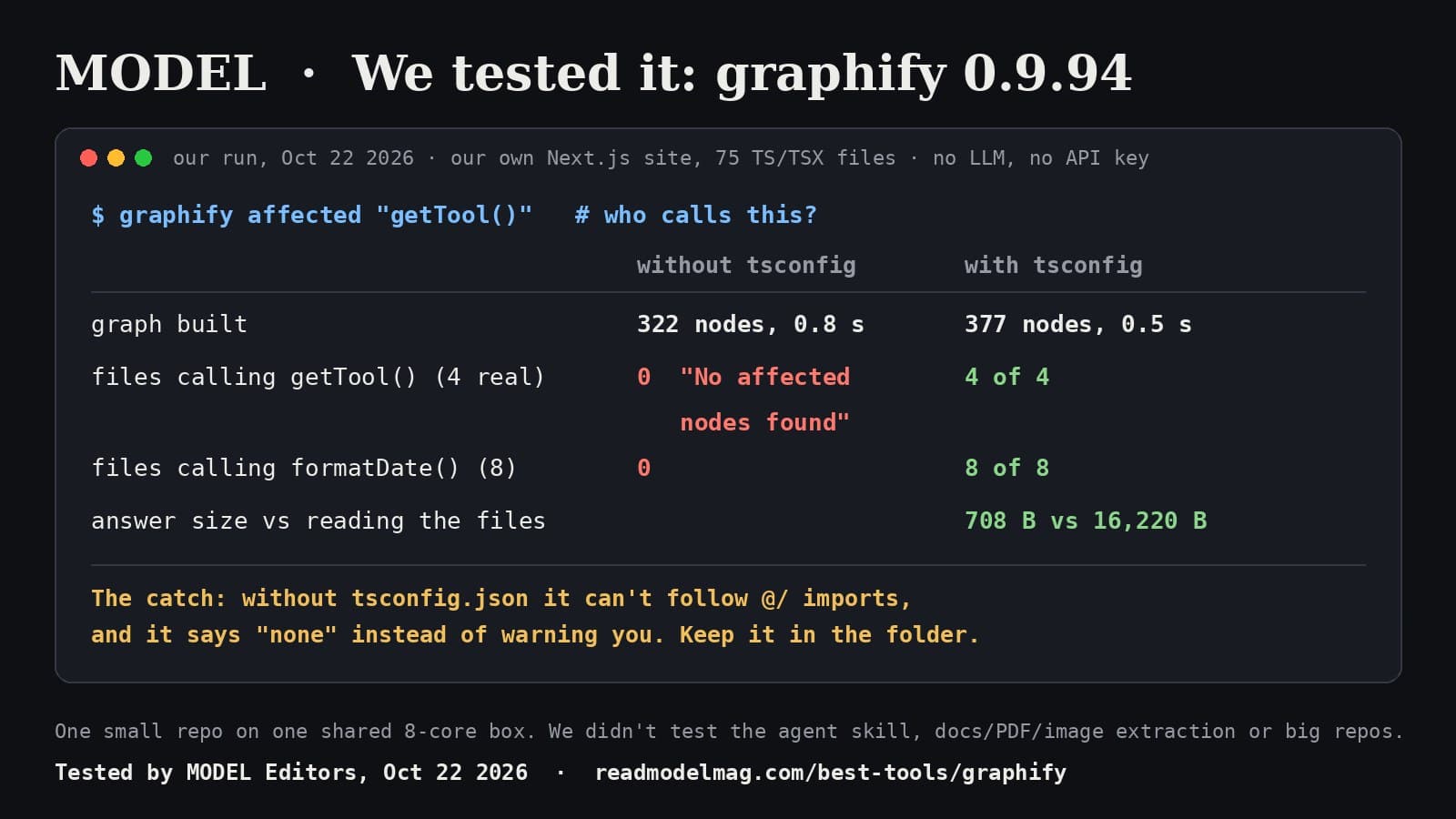
First run, code folders only: 322 nodes and 602 edges in 0.8 seconds. Then we asked which code is affected by getTool(), a function four of our pages call. It answered "No affected nodes found." Same for formatDate(), which eight files call: zero. Our pages import through the @/ shortcut defined in tsconfig.json, and that file wasn't in the folder, so graphify couldn't resolve the imports. Nothing in the output told us.
Second run, with tsconfig.json added: 377 nodes and 1,085 edges in half a second, from scratch. Now it was right every time we checked:
getTool(): 4 of 4 calling files, each with the calling function and line numberformatDate(): 8 of 8absoluteUrl(): 3 of 3getStories(): 8 of 8, including callers inside the same file- No wrong files in any answer
The answer is also small. For getTool() it was 708 bytes, against 16,220 bytes for the four files an agent would otherwise read. That's about 23 times less to put in front of a model. The README's "71.5x fewer tokens" is the maker's figure on a bigger, mixed corpus. We didn't repeat it.
A free-text question was less useful. "How does a story page get its related stories" came back in a fifth of a second with the right starting points, but as a list of 39 nodes out of 216, cut off at our 800-token budget. It's a map, not an answer.
The catch. The silent miss. If the graph is built without the config that tells it how your imports resolve, it returns "nothing is affected" with the same confidence as a real answer. An agent that trusts it could change a function and skip the files that break. Run it from the project root, keep tsconfig.json (or your language's equivalent) in scope, and spot-check one answer against a text search before you rely on it.
What we did not test. The /graphify skill inside an agent, AI extraction of docs, PDFs, images and video, community labels, the MCP server, watch mode and git hooks, large repositories, languages other than TypeScript, the new URL-fetch security checks, Windows and macOS.
The verdict. Worth adding if your agent wastes context reading files to find callers. On our code it was fast, free to run and exact once configured. Treat an empty answer as "check the setup", not "safe to change".
Disclosure: not sponsored. No affiliate links. MODEL has no relationship with Graphify Labs. Full test notes, commands and outputs are kept by MODEL Editors.
Sources
- graphify 0.9.94 release notes (Oct 22, 2026)
Graphify Labs (GitHub)
- graphify repository and README
Graphify Labs (GitHub)
- graphifyy on PyPI
PyPI
See the MODEL tool card: graphify
FREE · EVERY WEEK
The top AI tools this week, tested.
Every week MODEL's editors pick the AI tools worth your time, try them hands-on, and tell you what's good, what's not, and who it's for. Free, in your inbox.
Free. Unsubscribe anytime. Our picks are editorial and can't be bought.
The weekly three is editorial. A subscription does not buy a place in it.
Continue
Tools
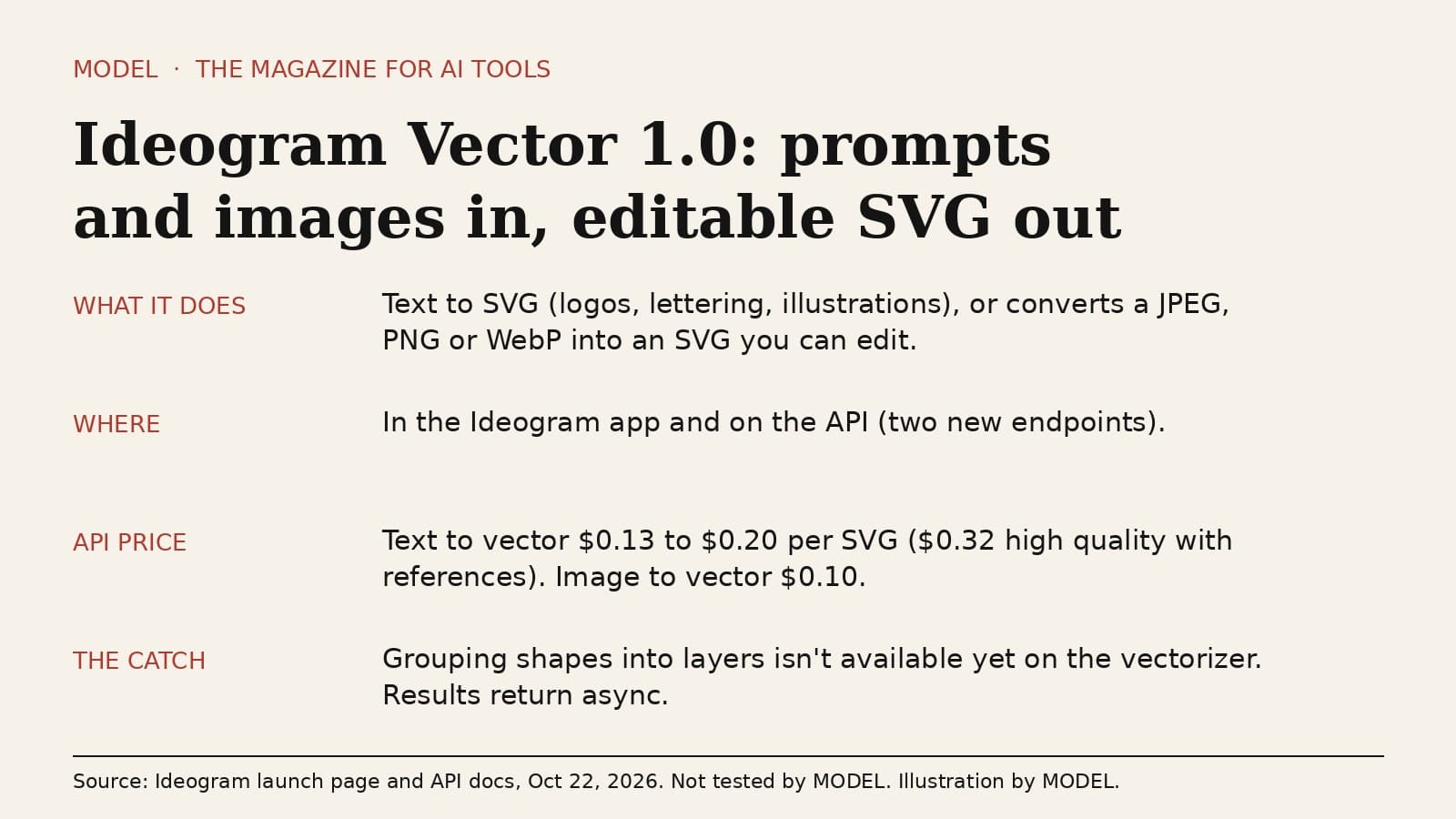
Ideogram Vector 1.0 turns a prompt or an image into an SVG you can actually edit
Ideogram launched its first vector model on October 22: describe a logo, wordmark or illustration and get back a clean SVG with editable colors, shapes and gradients, or upload a raster image and convert it. It's live in the Ideogram app and on the API. The honest caveat: the vectorizer can't group shapes into layers yet.
· MODEL Editors
Builder tip
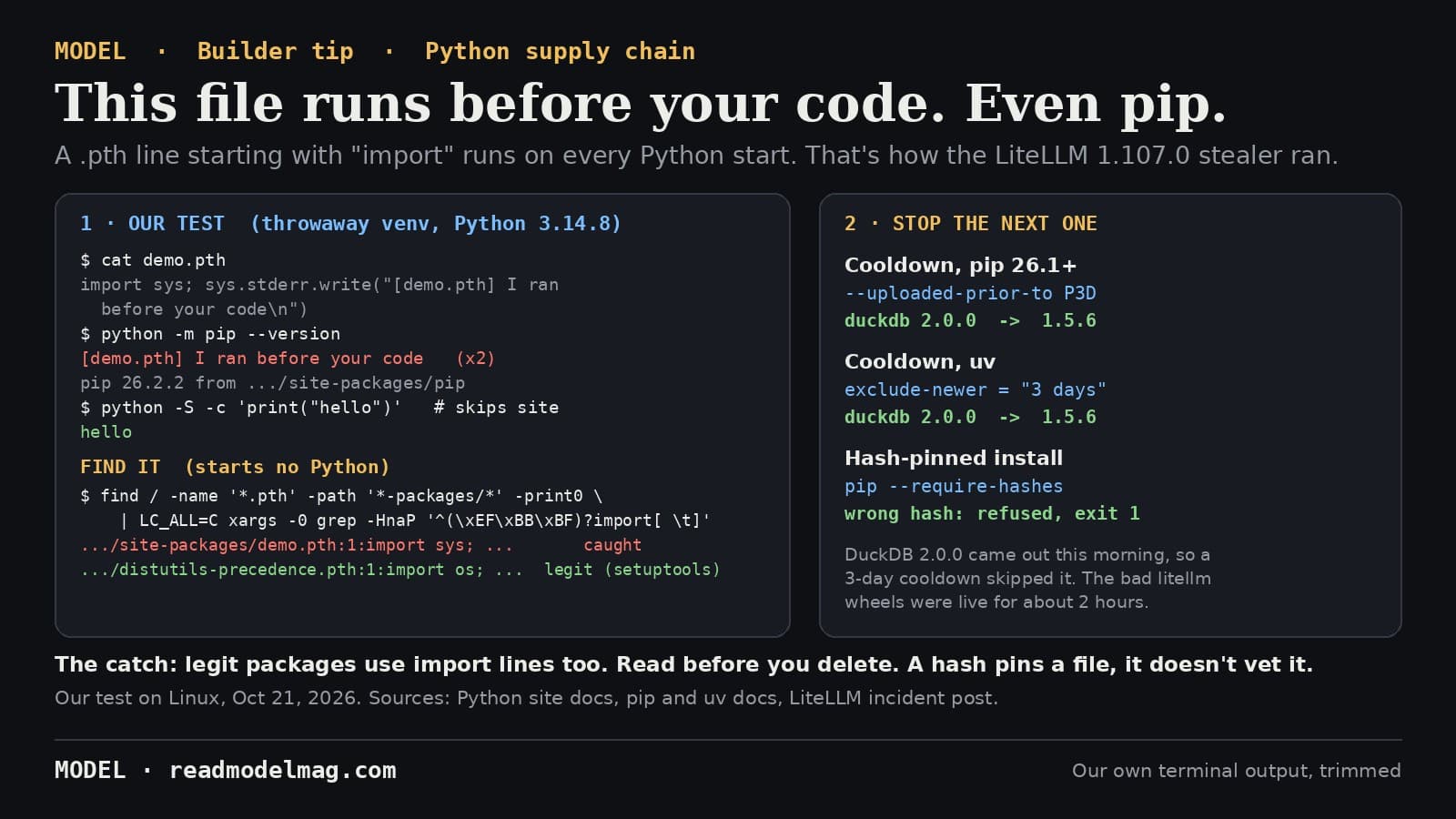
How to check your Python environment for a malicious .pth file, and dodge the next poisoned release
Today's LiteLLM 1.107.0 stealer ran from a .pth file, which Python executes on every start, even when you only run pip. Here is a one-line check that starts no Python, a harmless demo we ran ourselves, and two install settings that would have kept that release off your machine.
· MODEL Editors
Tools
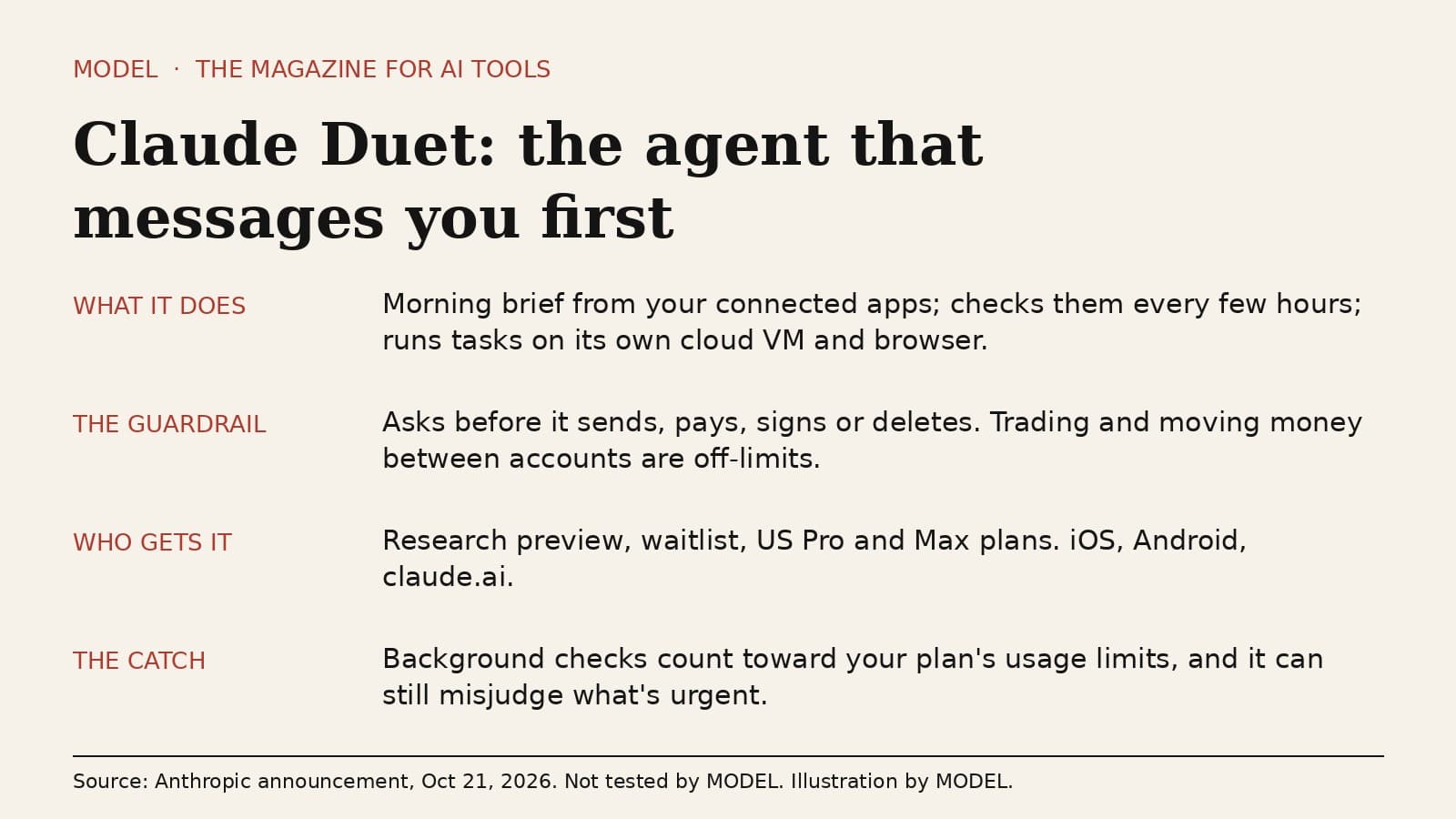
Claude Duet is an agent that messages you first. Watch the usage meter.
Anthropic opened a waitlist research preview of Claude Duet, a separate app where Claude sends a morning brief, checks your connected apps every few hours and runs tasks on its own cloud computer. It asks before it sends, pays, signs or deletes. The honest caveat: those background checks spend the same usage limits as the rest of your Claude plan.
· MODEL Editors