uv 0.13.6, tested: one script command could empty a folder you pointed it at. Not anymore.
SummaryIn uv 0.13.5, running a script with --active and VIRTUAL_ENV set to a normal folder deleted that folder's contents and put a virtual environment in its place, with no warning. We reproduced it, then watched 0.13.6 refuse.
· MODEL Editors · 3 min read
Some links may be affiliate links. Disclosure
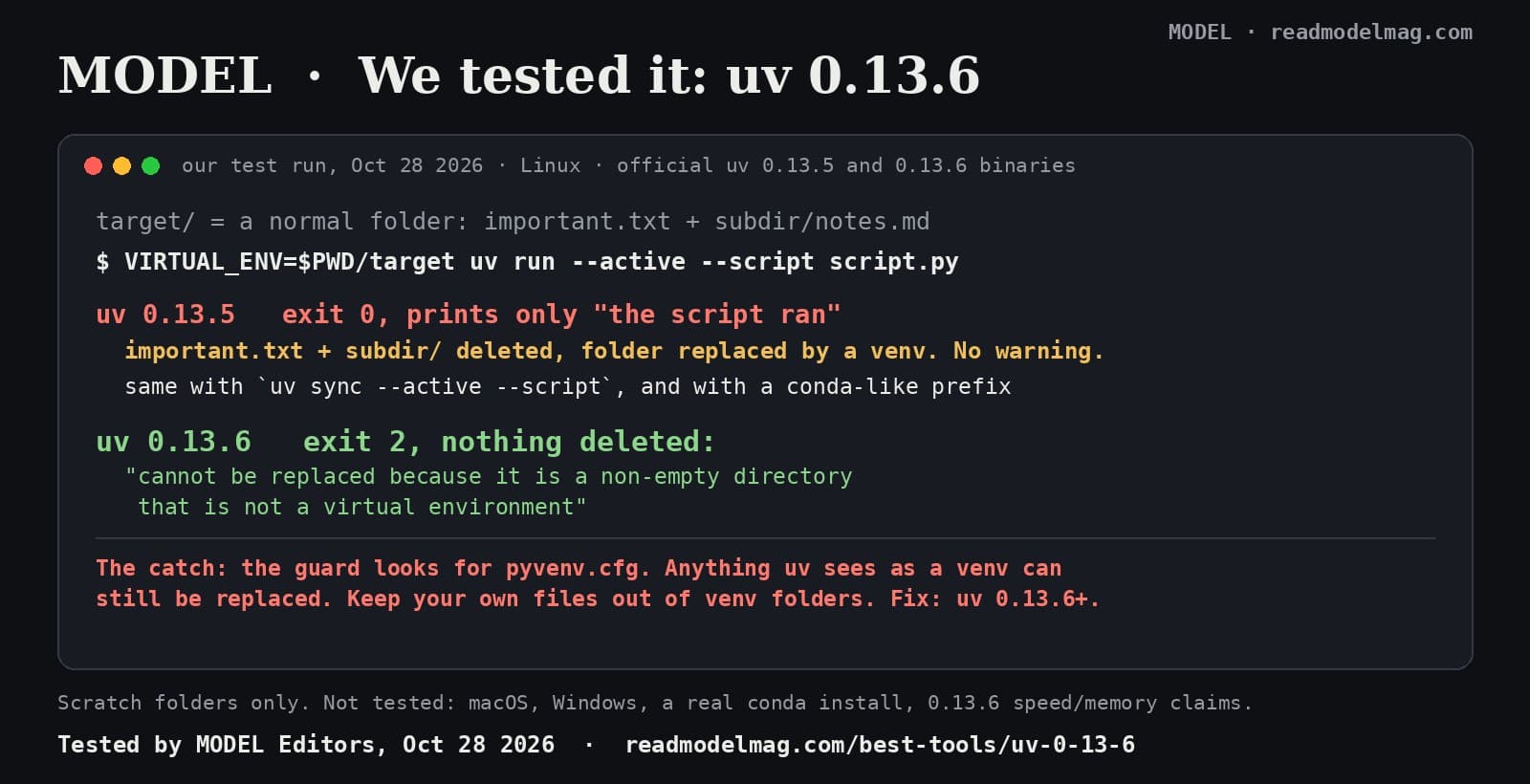
uv is Astral's free, open-source Python package and project manager, written in Rust, with about 91,000 stars on GitHub. Version 0.13.6 came out on October 26. Most of the release is new Python builds and lower memory use on big projects. One line in the bug fixes is worth reading twice: it stops uv run --active --script and uv sync --active --script "from deleting non-virtual-environment directories."
We tested that one, because it is the kind of bug you only notice after the files are gone.
The bug. Python scripts can list their own dependencies in a comment block at the top (PEP 723), and uv runs them in an environment it manages. The --active flag tells uv to use whatever VIRTUAL_ENV points to instead. According to issue #21364 (opens in a new tab), filed on August 30 against uv 0.12.7, if that folder wasn't a usable environment, uv deleted everything in it and built a fresh one there. The only sign was in verbose (-v) output. The issue also notes that pointing VIRTUAL_ENV at a conda environment is a suggested workaround for another uv issue, and conda environments don't have the pyvenv.cfg file uv looks for. uv's project commands already refused in this case; the script path didn't.
The test. On a Linux box, we downloaded the official uv 0.13.5 and 0.13.6 Linux binaries from GitHub and checked them against the published checksums. Following the issue's repro, we made a folder called target with important.txt ("very important data") and subdir/notes.md, plus a one-line script with an inline dependency block. Then we ran VIRTUAL_ENV=$PWD/target uv run --active --script script.py, and separately uv sync --active --script script.py. Every case ran in a fresh scratch folder with its own uv cache.
What happened.
- uv 0.13.5,
run: exit code 0. It printed only the script's output.targetnow held a virtual environment (bin,lib,pyvenv.cfgand so on);important.txtandsubdirwere gone. - uv 0.13.5,
sync: exit code 0, "Updating script environment at: target". Same result: both files gone. - uv 0.13.6,
runandsync: exit code 2, "error: Script environment at…/targetcannot be replaced because it is a non-empty directory that is not a virtual environment". Both files still there. - A conda-like folder (its own
bin/python, aconda-metafolder and a user file, nopyvenv.cfg) with a script that needs a newer Python: 0.13.5 wiped it and made a venv; 0.13.6 refused with the same error. - Unchanged in both: an empty or missing folder still gets a new environment, which is what you want.
The catch. The new check is whether the folder has a pyvenv.cfg file. The PR (opens in a new tab) says it keeps "virtualenv replacement", so a folder uv sees as a virtual environment can still be replaced. In our one test of a fake venv with a user file inside, both versions stopped with an error before deleting anything, but the rule stands: don't keep your own files inside a venv. And the fix is only in 0.13.6 and later; we didn't test which older versions are affected.
What we did not test. macOS and Windows, a real conda install, versions older than 0.13.5, and the rest of 0.13.6: the memory and speed claims, the new Python builds and the preview features.
The verdict. If you use --active with scripts, or ever point VIRTUAL_ENV at a conda environment, update with uv self update (or your package manager). For everyone else it's a routine update with one fix you'll be glad you never needed.
Disclosure: not sponsored. No affiliate links. MODEL has no relationship with Astral. Full test notes, commands and outputs are kept by MODEL Editors.
Sources
- uv 0.13.6 release notes
astral-sh (GitHub)
- PR #21464: Protect non-virtualenv directories with --active --script
astral-sh (GitHub)
- Issue #21364: `uv run --active --script` deletes the contents of a non-virtual-environment `VIRTUAL_ENV`
astral-sh (GitHub)
See the MODEL tool card: uv 0.13.6
FREE · EVERY WEEK
The top AI tools this week, tested.
Every week MODEL's editors pick the AI tools worth your time, try them hands-on, and tell you what's good, what's not, and who it's for. Free, in your inbox.
Free. Unsubscribe anytime. Our picks are editorial and can't be bought.
Continue
Tool Update
OpenAI's Tibo: dots are getting GPT-6 Astra, GPT-6.1 Terra, and more
OpenAI's Tibo Sottiaux said the team is expanding the frontier models that power ChatGPT dots beyond today's Astra-only setup, adding GPT-6.1 Terra for speed and personality so more people can get a dot. Your dot will pick the model. It hasn't shipped yet.
· MODEL Editors
Hot Take
Hot take: sloppy AI code is a checking problem, not a model problem
Anthropic says Claude wrote the Rust port of its Messages API, starting with no Rust developers on the team, and that the safety net was shadow traffic, not line-by-line review. The same week, Veracode found about 4 in 10 AI coding tasks still produce code with a known vulnerability. Here is what was actually said, what the viral version gets wrong, and our take.
· MODEL Editors

Tool Update
Notion's week: its agent now makes Excel, Word, PowerPoint and PDF files, and edits say which agent did them
Notion's Halloween recap bundles four updates from Oct 27 to 30: an agent that builds real office files, speaker labels for Google Meet notes, bigger automatic offline downloads, and a 'Last edited by' label that names the agent or MCP client behind a change. Here is what each one does, and what Notion hasn't said.
· MODEL Editors